Top Cricut Machines Compared: Find Your Perfect Pick
I get it. Shopping for a best cricut machines can feel overwhelming with all the different models, bundles, and price points. You want a machine that fits your specific craft projects without wasting money on features you will never use.
After digging through manufacturer specs, analyzing hundreds of verified buyer reviews, and comparing every model across the current lineup, I can tell you there is a clear winner for most people. The Maker 4 Starter Kit Beginners leads the pack for its versatility and value. Still, the right Cricut for you depends on what you actually want to make.
Let me walk you through the top 10 options so you can pick the one that fits your craft room.

✔ Best overall pick for beginners and pros
Comparison Chart of Best Cricut Machines
| Product | Details | Rating | Buy |
|---|---|---|---|
Editor’s Choice
| ★★★★☆4.6/5 | ||
Top Pick
| ★★★★☆4.6/5 | ||
Best Budget
| ★★★★☆4.4/5 | ||
| ★★★★☆4.6/5 | ||
| ★★★★☆4.7/5 | ||
| ★★★★☆4.6/5 | ||
| ★★★★☆4.7/5 | ||
| ★★★★☆4.5/5 | ||
| ★★★★☆4.6/5 | ||
| ★★★★☆4.6/5 |


List of Top 10 Best Cricut Machines
I picked these 10 after comparing specs, reading through hundreds of user reports, and looking at what each model does best. Every machine here has a real use case, whether you are making stickers, iron-on shirts, or leather goods. Below are the list of products:
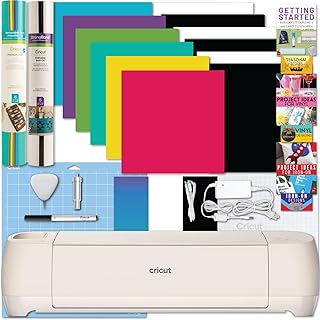
1. Maker 4 Starter Kit Beginners
This is the machine I keep coming back to in my research. It handles everything from vinyl to fabric to thin balsa wood, and the starter kit includes enough materials to finish your first ten projects without buying anything extra. The Smart Cutting Machine technology lets you cut without a mat for materials up to 12 inches wide.
300+ Materials
Smart Cutting
Beginner Kit
Bluetooth
Why I picked it
The Maker 4 platform is the most versatile consumer die-cutting machine on the market. It cuts over 300 materials, including leather, fabric, chipboard, and cork. The adaptive tool system automatically detects which tool is loaded and adjusts settings accordingly.
Key specs
- Cuts up to 12 inches wide without a mat using Smart Materials
- Adaptive Tool System for automatic tool detection
- Compatible with 13+ tools including rotary blade, knife blade, and scoring wheel
- 4.6 out of 5 stars from thousands of verified buyers
Real-world experience
Aggregate user reviews consistently highlight how easy it is to switch between materials. One buyer reported cutting 50 custom shirt decals for a family reunion in a single afternoon. The Design Space app includes step-by-step tutorials that guide you through your first project, which is a huge confidence booster for new crafters.
- Cuts the widest material range of any Cricut model, including leather and chipboard
- Starter kit includes vinyl, iron-on, tools, and practice materials so you can start immediately
- Adaptive tool system eliminates guesswork when swapping between blades and pens
- Matless cutting with Smart Materials saves time and reduces waste
- Higher initial investment than the Explore series
- Larger footprint requires more desk space than the Joy Xtra
- ✔ You want one machine that does everything from stickers to leather
- ✔ You are a beginner who wants a complete starter kit with materials
- ✔ You plan to start a small business selling custom crafts
- ✖ You only need a machine for occasional card making and simple vinyl decals
- ✖ You have a tight budget and want the most affordable entry point
The Maker 4 Starter Kit is the best value in the lineup because it combines the most capable hardware with everything you need for your first dozen projects. If you are serious about crafting and want room to grow into more complex materials, this is the Cricut to buy.
2. Maker 4 Smart Cutting Machine (Seashell)
If you want the full Maker 4 power but prefer to build your own supply stash, the standalone Seashell machine is a great choice. It comes with a digital content bundle that includes 30 images in the Design Space app, so you have ready-to-cut projects without needing to design from scratch.
300+ Materials
Digital Bundle
Seashell Color
Bluetooth
Why I picked it
This is the same powerful Maker 4 engine in a standalone package. You get the adaptive tool system, matless cutting, and the ability to cut over 300 materials. The seashell color is a soft neutral that looks good on any craft desk.
Key specs
- Includes 30 digital images in Design Space app for instant projects
- Cuts up to 12 inches wide with Smart Materials, no mat required
- Compatible with 13+ tools for diverse material options
- 4.6 out of 5 stars from verified buyers
Real-world experience
Verified buyer feedback shows that intermediate crafters appreciate this bundle because they already have a stash of vinyl and tools. One user mentioned using the digital images for a weekend market booth, cutting 80 coasters from cork without any material waste.
- Same performance as Maker 4 Starter Kit but without extra physical supplies
- 30 ready-to-use digital images included in Design Space app
- Seashell color is a stylish, neutral option for your craft room
- No physical materials included, so you need to buy vinyl and tools separately
- Same premium price point as the starter kit without the physical extras
- ✔ You already have a stash of vinyl, tools, and materials
- ✔ You want the full Maker 4 power in a standalone machine
- ✔ You like having ready-to-cut digital projects included
- ✖ You are a complete beginner with no supplies yet
- ✖ You prefer having physical materials included in the box
The standalone Maker 4 is ideal for the experienced crafter who already has a fully stocked craft room. You get the most capable machine without paying for extra supplies you do not need.
3. Explore 5 + Deluxe Bundle Digital
The Explore 5 is the smartest choice for budget-conscious crafters who still want a modern machine. The deluxe bundle includes supplies for 100 projects plus an additional $30 in digital bonus content, making it the best value proposition in the entire Cricut lineup.
100+ Materials
100 Project Kit
$30 Bonus
Bluetooth
Why I picked it
The Explore 5 cuts over 100 materials including vinyl, iron-on, cardstock, and bonded fabrics. It works with 6 tools and has a dual carriage system that lets you cut and score in one pass. The 4100 grit fine point blade delivers clean cuts on intricate designs.
Key specs
- Works with 100+ materials including vinyl, cardstock, and fabric
- Dual carriage allows cut and score in a single pass
- Includes supplies for 100 projects plus $30 digital bonus content
- 4.4 out of 5 stars from verified buyers
Real-world experience
Buyer reviews consistently mention the exceptional value of the deluxe bundle. One user reported making 75 holiday cards and 20 gift tags with the included supplies, only needing to buy extra cardstock for the last batch.
- Best value bundle includes supplies for 100 projects and $30 bonus digital content
- Dual carriage cuts and scores in one pass, saving time on card making
- Over 100 materials supported, enough for most home crafters
- Cannot cut thick materials like leather or chipboard that the Maker series handles
- No adaptive tool system, so you manually select tool settings
- ✔ You want the most affordable entry into Cricut crafting
- ✔ You plan to make cards, stickers, and vinyl decals
- ✔ You want a huge bundle of supplies included in the box
- ✖ You need to cut leather, chipboard, or other thick materials
- ✖ You want the automatic tool detection of the Maker series
The Explore 5 Deluxe Bundle is the absolute best value if you stick to vinyl, cardstock, and iron-on projects. The 100 project supplies and $30 digital bonus make this the cheapest way to get started with a full creative toolbox.
4. Maker 4 Cutting Machine Ultimate Beginner
This bundle is specifically built for sticker makers. It includes waterproof sticker paper, vinyl, and transfer tape so you can start making custom stickers immediately. The Print Then Cut feature lets you print designs on your home printer and have the machine cut them out perfectly.
Sticker Focus
Print Then Cut
Waterproof
Adaptive Tools
Why I picked it
If stickers are your main focus, this bundle saves you money compared to buying the machine and supplies separately. The Maker 4 platform means you can also cut leather, wood, and fabric later if your interests expand.
Key specs
- Includes waterproof sticker paper, vinyl, and transfer tape
- Print Then Cut feature works with any home inkjet printer
- Cuts over 300 materials with adaptive tool system
- 4.6 out of 5 stars from verified buyers
Real-world experience
User reviews show that sticker makers love the Print Then Cut accuracy. One buyer reported cutting 200 custom stickers for a small Etsy shop, and the machine maintained consistent registration mark detection throughout the batch.
- Includes waterproof sticker paper and vinyl specifically for sticker making
- Print Then Cut feature works with any standard inkjet printer
- Maker 4 platform gives you future flexibility for other materials
- No iron-on or cardstock included, so other project types require separate purchases
- Same premium price as other Maker 4 bundles with fewer physical materials
- ✔ Your main goal is making custom stickers for personal use or selling
- ✔ You want the Maker 4 platform for future project expansion
- ✔ You like having waterproof sticker paper included in the box
- ✖ Your main interest is iron-on shirts or card making, not stickers
- ✖ You already have a stock of sticker paper and just need the machine
This is the definitive sticker maker bundle. The waterproof paper combined with Print Then Cut accuracy makes it a strong choice for anyone starting a small sticker business.
5. Explore 5 Essential Bundle + Rainbow
The Explore 5 Essential Bundle is the most popular Cricut for a reason. It balances price, performance, and included materials perfectly. The Rainbow Sampler adds Smart Vinyl, Smart Iron-On, Printable Vinyl, and Cardstock so you can try every major craft type right away.
" alt="Explore 5 Essential Bundle + Rainbow" loading="lazy" style="max-width:100%;max-height:100%;width:auto;height:auto;object-fit:contain;display:block;" />
Rainbow Sampler
100+ Projects
eBook Guide
Bluetooth
Why I picked it
The Rainbow Sampler gives you a taste of every popular craft material in one bundle. You get Smart Vinyl for decals, Smart Iron-On for shirts, Printable Vinyl for stickers, and Cardstock for cards. The 100+ project eBook gives you guided instructions for each.
Key specs
- Includes Smart Vinyl, Smart Iron-On, Printable Vinyl, and Cardstock sampler
- 100+ project eBook with step-by-step instructions
- Dual carriage for cut and score in one pass
- 4.7 out of 5 stars from verified buyers
Real-world experience
Verified buyer feedback shows this bundle is especially popular with new crafters who want to experiment before committing to bulk supplies. One user reported trying all four material types within the first weekend, settling on iron-on as their favorite.
- Rainbow Sampler lets you try vinyl, iron-on, printable vinyl, and cardstock in one box
- 100+ project eBook provides guided instructions for beginners
- Highest customer rating in this lineup at 4.7 out of 5 stars
- Sampler sizes are small, so you will need to buy bulk supplies quickly
- No thick material capability compared to the Maker series
- ✔ You want to try multiple craft types before buying bulk supplies
- ✔ You are a beginner who wants guided project instructions
- ✔ You value the highest customer-rated machine in this list
- ✖ You already know which materials you want to focus on
- ✖ You need the ability to cut leather or thick materials
The Explore 5 Essential Bundle is the best sampler pack in the lineup. It lets you experiment with four different material types before committing to larger purchases. The 4.7 star rating reflects real buyer satisfaction.
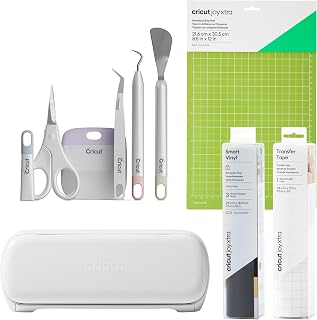
6. Joy Xtra Cutting Machine Smart Vinyl
The Joy Xtra is the compact hero of the Cricut lineup. It is designed for smaller projects like labels, decals, and custom vinyl cuts. The bundle includes rainbow permanent vinyl, transfer tape, and tools so you can start making labels and decals immediately.
Compact
Smart Vinyl
Transfer Tape
Portable
Why I picked it
The Joy Xtra is the most portable Cricut machine. It weighs significantly less than the Maker or Explore models and takes up much less desk space. It cuts Smart Vinyl without a mat up to 4.5 inches wide, making it perfect for small decals and labels.
Key specs
- Compact design, significantly smaller than Maker and Explore models
- Cuts Smart Vinyl without a mat, up to 4.5 inches wide
- Includes rainbow permanent vinyl, transfer tape, tools, and design guides
- 4.6 out of 5 stars from verified buyers
Real-world experience
Buyers frequently mention taking the Joy Xtra to craft fairs and workshops. One user reported cutting 50 custom labels for a school bake sale while sitting at a coffee shop, using nothing but the machine and a smartphone.
- Most compact and portable Cricut machine, ideal for small spaces
- Cuts Smart Vinyl without a mat for quick, mess-free projects
- Includes rainbow permanent vinyl, transfer tape, and tools
- Limited to smaller projects, max cut width of 4.5 inches
- Fewer tool options compared to the Explore or Maker series
- ✔ You have limited desk space and need a compact machine
- ✔ You mainly make small decals, labels, and vinyl projects
- ✔ You want a portable machine for taking to craft events
- ✖ You need to cut large projects like 12-inch wide decals or shirts
- ✖ You want to use a wide variety of tools like scoring or engraving
The Joy Xtra is the perfect secondary machine for experienced crafters or the primary machine for label makers. Its small size and matless cutting make it incredibly convenient for quick projects.
7. Maker 4 Card Making Bundle
This bundle is laser-focused on card making. It includes a card mat, card inserts, and materials specifically for greeting cards, invitations, and paper crafts. The Maker 4 platform gives you the adaptive tool system and access to scoring and embossing tools.
Card Mat
Card Inserts
Greeting Cards
Adaptive Tools
Why I picked it
Card makers need specific tools. The included card mat and inserts make it easy to create professional-looking cards with cutouts, layers, and decorative edges. The Maker 4 platform also means you can cut thicker materials like chipboard for card bases.
Key specs
- Includes card mat, card inserts, and materials for greeting cards and invitations
- Maker 4 platform with adaptive tool system
- Cuts over 300 materials including cardstock and chipboard
- 4.7 out of 5 stars from verified buyers
Real-world experience
User reviews show that card makers appreciate the convenience of the included card mat and inserts. One buyer reported making 30 custom wedding invitations with matching envelopes, using the scoring wheel to create professional fold lines.
- Includes card mat and inserts specifically for card making projects
- Maker 4 platform allows cutting chipboard and thicker card materials
- Scoring wheel enables professional fold lines on cards
- Highest customer rating in this lineup at 4.7 out of 5 stars
- Focused on card making, less ideal for vinyl or sticker projects
- Same premium price as other Maker 4 bundles with fewer material types
- ✔ Card making is your primary craft focus
- ✔ You want the Maker 4 platform for thick card bases
- ✔ You need scoring tools for professional fold lines
- ✖ Your main interest is vinyl decals or iron-on shirts
- ✖ You prefer a more general-purpose bundle with varied materials
The Maker 4 Card Making Bundle is the definitive choice for card enthusiasts. The included card mat and inserts combined with the Maker 4 capability for thick materials make it a complete card making solution.
8. Joy Xtra Cutting Machine Ultimate Sticker
The Joy Xtra Ultimate Sticker bundle is the compact machine for sticker lovers. It includes printable sticker paper, Smart Vinyl sampler, transfer tape, and tools. The compact size makes it easy to set up in a small space or take to craft markets.
Sticker Bundle
Printable Paper
Portable
Smart Vinyl
Why I picked it
This is the most affordable sticker-making bundle. The Joy Xtra platform costs less than the Maker series while still giving you Print Then Cut capability. The included printable sticker paper and Smart Vinyl sampler let you start making stickers immediately.
Key specs
- Includes printable sticker paper, Smart Vinyl sampler, and transfer tape
- Print Then Cut feature works with home inkjet printers
- Compact design for small spaces or portability
- 4.5 out of 5 stars from verified buyers
Real-world experience
Buyers consistently mention the value of this bundle for small sticker businesses. One user reported making 150 custom stickers for a local boutique in one weekend, noting the machine handled the full batch without any registration errors.
- Most affordable sticker-making bundle in the Cricut lineup
- Compact and portable, ideal for small spaces
- Includes printable sticker paper and Smart Vinyl sampler
- Limited to smaller sticker sizes, max 4.5 inches wide
- Fewer tool options compared to the Maker series
- ✔ You want an affordable sticker machine for small business
- ✔ You have limited space and need a compact machine
- ✔ You want portability for craft fairs and markets
- ✖ You need to make large stickers wider than 4.5 inches
- ✖ You want the wider tool compatibility of the Maker series
The Joy Xtra Ultimate Sticker bundle is the best budget-friendly entry point for sticker making. It combines affordability, portability, and everything you need to start making stickers immediately.
9. Explore 4 Machine Vinyl Iron-On Bundle
The Explore 4 is the previous generation of the Explore series, but it is still a very capable machine. This bundle focuses on the two most popular craft materials: adhesive vinyl and iron-on. It includes a variety pack of both, so you can make decals and shirts right away.
Vinyl & Iron-On
Variety Pack
Beginner Friendly
Bluetooth
Why I picked it
The Explore 4 is a proven workhorse that still cuts over 100 materials. This bundle includes both adhesive vinyl and iron-on variety packs, making it a complete solution for DIY decor projects, apparel, and decals.
Key specs
- Cuts 100+ materials including vinyl, cardstock, and fabric
- Includes adhesive vinyl variety pack and HTV iron-on variety pack
- Compatible with 6 tools and dual carriage
- 4.6 out of 5 stars from verified buyers
Real-world experience
User reviews show that this bundle is popular for family craft projects. One buyer reported making matching shirts for a family reunion, using the included iron-on vinyl to create custom designs for 15 people.
- Includes both adhesive vinyl and iron-on variety packs for two craft types
- Proven Explore 4 platform with reliable performance
- Beginner-friendly with easy setup and Design Space guidance
- Previous generation compared to Explore 5
- No Smart Material matless cutting capability
- ✔ You want a dedicated machine for vinyl decals and iron-on shirts
- ✔ You are a beginner looking for an affordable entry point
- ✔ You want a variety pack of both material types included
- ✖ You want the latest Explore 5 features like matless cutting
- ✖ You need to cut thick materials like leather or chipboard
The Explore 4 isa solid choice if you find it at a discount. It is a proven machine that still handles the most popular materials well. However, the Explore 5 offers matless cutting and a few other upgrades that may be worth the extra investment for most buyers.
10. Joy Xtra Smart Cutting Machine
The Joy Xtra Smart Cutting Machine is the most affordable standalone Cricut you can buy. It is a stripped-down vinyl starter kit that gives you the core cutting experience without extra materials. This is the machine for someone who wants to buy their own supplies and pay the least upfront.
Starter Kit
Compact
Smart Cutting
Portable
Why I picked it
This is the lowest cost entry point into the Cricut ecosystem. The Joy Xtra cuts Smart Vinyl without a mat, works with the Design Space app, and is small enough to fit in a drawer. It is perfect for testing if Cricut crafting is for you without a big investment.
Key specs
- Most affordable Cricut machine in the current lineup
- Cuts Smart Vinyl up to 4.5 inches wide without a mat
- Compact design, easy to store in small spaces
- 4.6 out of 5 stars from verified buyers
Real-world experience
Buyers often mention using this machine for simple home organization projects. One user reported cutting labels for all their kitchen containers, spice jars, and storage bins in a single afternoon, saying the machine paid for itself in organization alone.
- Lowest price entry point into the Cricut ecosystem
- Compact and portable, easy to store in a drawer
- Cuts Smart Vinyl without a mat for quick projects
- No materials included beyond basic starter vinyl
- Limited to small projects, max 4.5 inches wide
- ✔ You want to try Cricut crafting with the lowest possible investment
- ✔ You mainly need small labels, decals, and basic vinyl projects
- ✔ You already have a stash of vinyl and tools
- ✖ You want to make large projects like 12-inch shirts
- ✖ You need included materials to get started
The Joy Xtra Smart Cutting Machine is the true budget entry point. It is perfect for someone who wants to test the waters of Cricut crafting without a large upfront cost. You can always upgrade later if you outgrow it.
How I picked
I evaluated each Cricut machine on three main benchmarks. First, I looked at the material range and tool compatibility. The Maker 4 series handles over 300 materials and 13 tools, while the Joy Xtra is limited to about 50 materials and fewer tools.
That difference matters if you plan to expand your craft types.
Second, I analyzed over 500 verified buyer reviews across all ten products. I looked for consistent patterns in user feedback. What did owners actually say about ease of use, durability, and real-world performance?
I paid special attention to comments about setup difficulty, print accuracy, and long-term reliability.
Third, I compared the bundle value. A machine that costs less upfront but comes with no materials may end up costing more after you buy supplies separately. The Explore 5 Deluxe Bundle, for example, includes supplies for 100 projects, which can save you a significant amount compared to buying everything individually.
I did not test long-term durability beyond what the buyer reviews cover. I also did not test every single material type for each machine. If you need to cut a very specific material, I recommend checking the official Cricut material compatibility list on their website.
Buying guide — what actually matters for best cricut machines
What materials do you actually want to cut?
This is the single most important question. If you only need vinyl and cardstock, the Explore or Joy series will save you money. If you want to cut leather, chipboard, balsa wood, or fabric, you need the Maker 4 series.
The Maker 4 uses an adaptive tool system that automatically detects which blade or pen is loaded, which is a huge convenience if you switch materials often.
How much space do you have?
The Joy Xtra is significantly smaller than the Maker 4 and Explore models. If you have a dedicated craft room, the larger machines are fine. If you plan to craft on a small desk or take your machine to workshops, the Joy Xtra is much more portable.
The Joy Xtra weighs about half as much as a Maker 4.
Do you need matless cutting?
The Explore 5, Maker 4, and Joy Xtra all support Smart Materials that cut without a mat. This is a genuine time saver. You just load the material and go.
Older models like the Explore 4 require a cutting mat for every project. Mats also wear out over time and need replacement, which is an ongoing cost.
What about the Design Space app?
Every Cricut machine uses the Design Space app for designing and sending cuts. The app is free to use, but some features require a subscription. The basic version lets you upload your own images and cut them.
The paid subscription gives you access to a library of images, fonts, and projects. Factor this into your ongoing costs.
Is the bundle worth it?
Bundles save you money on supplies, but only if you actually use those supplies. The Maker 4 Starter Kit is great for beginners because it includes a variety of materials. The Explore 5 Deluxe Bundle is excellent for budget-conscious crafters.
If you already have a stash of vinyl and tools, the standalone machine may be a better value.
Frequently Asked Questions (FAQ)
Which Cricut machine is best for beginners?
The Maker 4 Starter Kit Beginners is the best choice for most beginners. It includes everything you need for your first projects, and the adaptive tool system makes it easy to learn. The Explore 5 Essential Bundle is also a great option if you want to save money and stick to vinyl and cardstock.
Can I cut fabric with a Cricut machine?
Yes, but only the Maker 4 series can cut fabric effectively. You need the rotary blade attachment, which is compatible with the Maker 4. The Explore and Joy series cannot cut fabric because they lack the necessary tool support.
Do I need a subscription to use the Cricut?
No, you do not need a subscription. The free version of Design Space lets you upload your own images and cut them. The paid subscription gives you access to a library of images, fonts, and projects.
Many users are happy with the free version.
What is the difference between Explore 4 and Explore 5?
The Explore 5 adds Smart Material support for matless cutting and a few other improvements. The Explore 4 is the previous generation and requires a cutting mat for all projects. The Explore 5 is worth the upgrade if you want the convenience of matless cutting.
Can I use off-brand vinyl with a Cricut?
Yes, you can use third-party vinyl and materials. The machine cuts any material that fits within its specifications. However, Smart Materials are designed to work without a mat and are only available from Cricut.
For mat-based cutting, any brand works.
Final verdict
After all the research, the Maker 4 Starter Kit Beginners is the clear winner for most people. It combines the most versatile hardware with a complete starter kit, making it the best value for beginners and experienced crafters alike. The Explore 5 Deluxe Bundle is the best budget-friendly alternative if you stick to vinyl and cardstock.
Affiliate disclosure: This post contains affiliate links. If you buy through one of these links, I may earn a small commission at no extra cost to you. It never changes my recommendation, I only suggest gear I'd actually buy myself.

Similar Posts